【Kindle Comic Converter下载】Kindle Comic Converter(漫画转换EPUB工具) v5.5.2 官方正式版
时间:2025/1/12作者:未知来源:三度网教程人气:
软件介绍
Kindle Comic Converter是一款小巧好用的图片转换工具。Kindle Comic Converter可轻松将漫画或者图片转换成文字,以便在多种电子阅读平台进行阅读。
软件特色
Kindle Comic Converter (KCC) 是一个可以把 PNG、JPG、GIF、CBZ、CBR 和 CB7 格式的漫画转换成 EPUB 或 MOBI 格式电子书的免费开源软件,制作 E-Ink 设备适用的电子书从此轻而易举。KCC 最初是专门为 Kindle 所开发的,但是现在对 EPUB 3.0 和 CBZ 也有效。此外 KCC 在处理图片时会针对电子墨水显示屏进行全面优化。
KCC 支持 Windows、Mac OS X 以及 Linux 系统平台
功能介绍
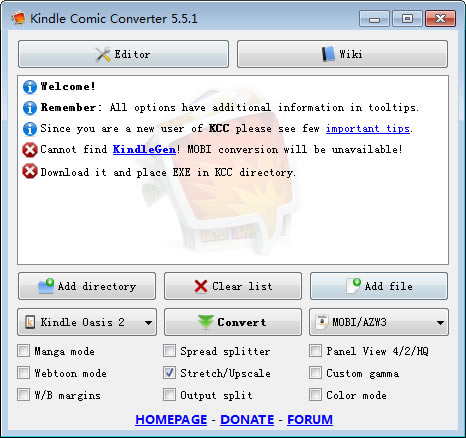
Manga mode
连载漫画模式Enable right-to-left reading.
开启从右向左翻页。
Sdivad splitter
版面分割Unchecked – Split
不勾选 – 分割
Double page sdivads will be cut into two separate pages.
Indeterminate – Rotate and split
不定 – 旋转和分割
Double page sdivads will be displayed twice. First rotated and then split.
Checked – Rotate
勾选 – 旋转
Double page sdivads will be rotated.
Panel View 4/2/HQ
面板视图 4/2/HQUnchecked – 4 panels
不勾选 – 4 个面板
Zoom each corner separately.
Indeterminate – 2 panels
不定 – 2 个面板
Zoom only the top and bottom of the page.
Checked – 4 high-quality panels
勾选 – 4个高清面板
Zoom each corner separately. Try to increase the quality of magnification. Check wiki for more details.
Webtoon mode
Webtoom 连载模式Enable special parsing mode for WebToons.
为WebToons启用特殊解析模式。
stretch/Upscale
拉伸/适应Unchecked – Nothing
未勾选 – 不设置
Images smaller than device resolution will not be resized.
Indeterminate – Stretching
不定 – 拉伸
Images smaller than device resolution will be resized. Aspect ratio woll be not divserved.
Checked – Upscaling
勾选 – 适应
Images smaller than device resolution woll be resized. Aspect ratio will be divserved.
Custom gamma
自定义伽马值Disable automatic gamma correction.
禁止自动调整伽马值
W/B margins
白色/黑色 外边距Unchecked – Autodetection
未勾选 – 自动检测
Color of margins fill will be detected automatically.
Indeterminate – White
不定状态 – 白色
Margins will be filled with white color.
Checked – Black
勾选 – 黑色
Margins will be filled with black color.
Output split
输出分割Unchecked – Automatic mode
勾选 – 自动模式
The output will be split automatically.
Checked – Volume mode
勾选 – 卷模式
Every subdirectory will be considered as a separate volume.
Color mode
颜色模式Disable conversion to grayscale.
禁止转换为灰度。
下载地址
- PC版
关键词: Kindle Comic Converter Kindle Comic Converter下载 Kindle Comic Converter官方下载